

 Caught
 Spun
Teleport
Click anywhere on the map and fly there. See the distance and the cooldown you should wait before you act.
Go anywhere. Play everywhere.
Control Pokémon GO teleports, joystick walks, routes and GO Plus auto-catch from your computer or Android phone. Nothing is installed on your iPhone.
Available for macOS · Windows · Android · Version 145

Designed for real play sessions, not demos: clear status, safe cooldowns and things that keep working when you look away.
Click anywhere on the map and fly there. See the distance and the cooldown you should wait before you act.
Walk with WASD or arrow keys at a realistic speed. Hold to keep turning.
Always know how long to wait after a jump, right in the status bar.
Drop stops on the map or import a GPX file. Loop it, pause it, pick it up later.
Auto catch and auto spin while you walk, with a running tally.
Caught128
Spun64
Move several phones from one computer, together or one by one.
Real gameplay recordings: the game on your iPhone, the app on your computer, moving together.
100% safe
No hacks, nothing installed, nothing uploaded. Here’s exactly what that means.
100%
iOS stays exactly as Apple ships it. No exploits and no system changes — updates keep working.
100%
No app, profile or certificate to install. Disconnect and the iPhone is back to its real location in seconds.
100%
Locations are generated on your own computer or Android phone and never uploaded. We only see whether a connection worked.
0 s
After every jump the status bar counts down how long to wait before you catch or spin.
iGoFlyer shows the cooldown after every jump — playing by it is the safest way to play.
iPhone
Nothing to install on the phone
Mac
Windows PC
Android phone
Runs iGoFlyer and talks to your iPhone over Bluetooth
Pair once over Bluetooth. Next time it reconnects on its own.
Click the map, search a city or paste coordinates.
Teleport instantly, or walk with the joystick and routes.
Made for Pokémon GO players
The things players actually use iGoFlyer for — every one of them works with nothing installed on your iPhone.



Live somewhere quiet? Fly to a park with stops on every corner and keep your items stocked.
Fly to Central Park, New York




Farfetch’d in Asia, Mr. Mime in Europe, Tauros in North America, Kangaskhan in Australia — complete your Pokédex without a plane ticket.
Fly to Shibuya, Tokyo


Remote raids are limited. Big cities always have a full lobby for Legendary and Mega raids.
Fly to Taipei 101

Community Day runs in local time. Finish yours, then hop to a later time zone and play it again.
Hop from Sydney to London


Nests move every few weeks. Jump to a nest the community just found and search for shinies.
Fly to Marina Bay, Singapore


Walk a loop at a realistic speed — distance only counts below about 10 km/h — while GO Plus spins every stop.
Loop a 2 km park route
What’s live now and what’s coming, with times in your own time zone.
 Wild AreaLive
Sat, Nov 14, 10:00 AM – Sun, Nov 15, 6:00 PM local time
 OtherLive
Fri, Nov 6, 10:00 AM – Sun, Nov 15, 11:59 PM local time
 GO Battle LeagueLive
Tue, Nov 10, 9:00 PM – Tue, Nov 17, 9:00 PM UTC
Live
100 IV spawns and the busiest raid cities right now, refreshed every few minutes. Copy, paste into iGoFlyer, fly.

Noibat100%
CP 495 · Lv 26 ·
52.27302, 4.87421
Shellos100%
CP 941 · Lv 29 ·
52.12026, -106.68266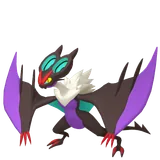
Noivern100%
CP 2645 · Lv 37 ·
41.30742, 2.01282Beyond Pokémon GO
iGoFlyer changes the iPhone’s system location, not one particular game. Other AR games, a bit of privacy, a look around before a trip — it all works the same way.
Forest, desert and swamp habitats rotate, and each brings different monsters and materials. Fly to the habitat you need to farm, then walk with the joystick to gather resource points.
Farm materials in a desert habitat
Plant flowers as you walk a route, and visit cafés, stations and parks to collect Decor Pikmin from all kinds of places.
Plant flowers along a 3 km riverside route
Even with location sharing always on, you deserve a little privacy — like planning a surprise without giving away where you’ve been.
Plan a birthday surprise, no spoilers
Heading somewhere for work or travel? Set your location there first, browse local matches ahead of time and have plans ready when you land.
Fly to Osaka a week before your trip
See what’s happening locally in other cities, use region-only filters and stickers, and explore the world on Snap Map.
Browse Tokyo on Snap Map
Test geofences, region-specific content and pricing, delivery zones and navigation routes for your app or website without leaving your desk.
Test a delivery zone in Singapore
iGoFlyer is not affiliated with any of these apps. Please follow each app’s terms of service. Location didn’t change? See the troubleshooting guide
Start free, upgrade when you are ready.
5 days of VIP for new Discord members
Free
For regular players
$10/month
No. iGoFlyer runs on your Mac, Windows PC or Android phone and talks to your iPhone over Bluetooth. Nothing is installed on the iPhone.
iGoFlyer itself is 100% safe: no jailbreak, nothing to install on your iPhone, no changes to Pokémon GO, and we never ask for your game account password. Your location is created on your own device and never uploaded. After every jump iGoFlyer shows the cooldown — playing by it is the safest way to play.
An iPhone, plus a Mac, a Windows PC or an Android phone with Bluetooth. Older Windows PCs may need a USB Bluetooth adapter — see our compatibility guide.
Yes, as long as you walk at a realistic speed. Pokémon GO only counts distance below about 10 km/h, so iGoFlyer’s walking presets stay under that.
Log in to the app with Discord and join our Discord server. New members get 5 days of VIP automatically.
No. Locations are generated on your own device and never uploaded. We only receive connection results, such as whether pairing succeeded.
Yes. Community Day runs in each region’s local time, so after your local event ends you can fly to a later time zone and play it again.
Yes. One computer can control up to 3 iPhones, together or one at a time.


iGoFlyer
Download iGoFlyer and claim 5 free VIP days on Discord.

